Your bank sees a charge.
Your receipts see the truth.
Forward a receipt to your private Receiptmark address. We name what is billing you, what it costs, when it renews.
Coming to the App Store
Free while we are in beta. No card, no bank login.
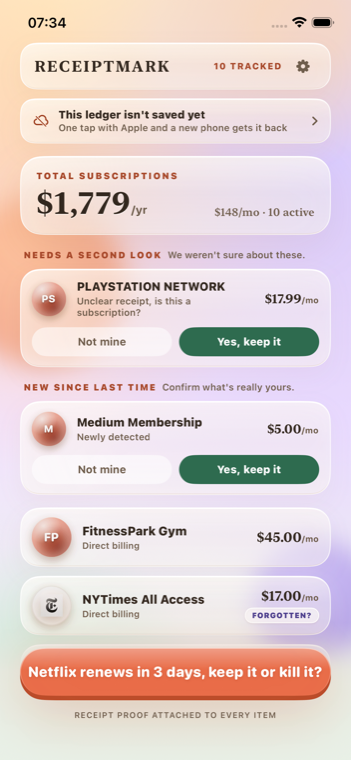
What your bank shows
What the receipts say
Install Receiptmark
The app creates a private forwarding address that belongs only to your ledger.
Forward your receipts
Search your mail for "receipt" and forward what comes back. One filter makes it automatic after that.
See the total, then cancel
Every subscription with its real renewal date, and the steps to get out of each one.
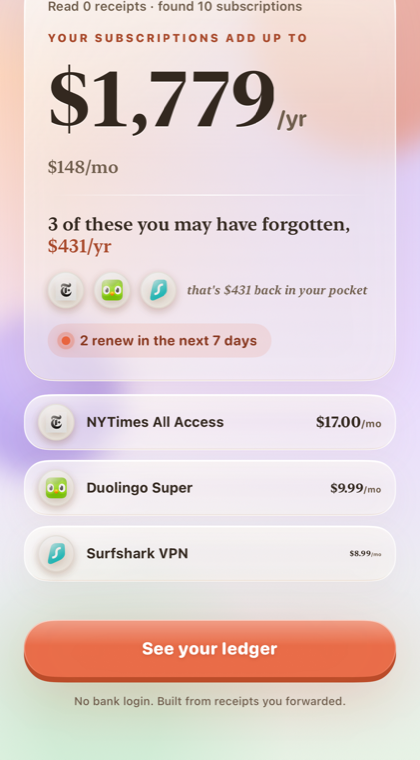
The number nobody adds up
- Every charge, namedAggregated card lines become the services behind them.
- Renewal dates that are realRead off the receipt, not guessed from a billing cycle.
- Price rises before they landA change notice is caught the day it arrives, not the day you are charged.
We would rather tell you the total is incomplete than quietly invent it.
We only see what you forward. A gym that never emailed you, a carrier add-on buried in a phone bill: those will not appear on their own. Add them by hand, or screenshot them and we will read the screenshot. Nothing is estimated to fill a gap.
Cancelling is the actual hard part
- The route that matches your billerApple-billed Netflix cannot be cancelled on Netflix. We send you to the right place.
- Honest about the wallsWhich ones need a phone call, which charge an early-termination fee, which will offer you half price to stay.
- Free to read, no accountEvery guide is public.
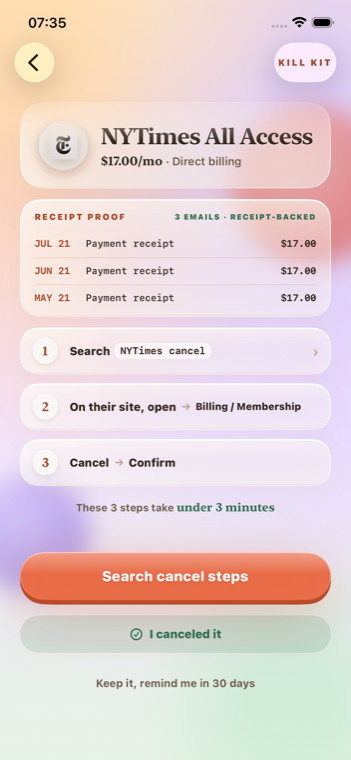
Cancellation guides
Written to be honest about which ones are genuinely hard.
Start with one forwarded receipt
You will know inside a minute whether there is anything hiding in there.
Coming to the App Store
Free while we are in beta. No card, no bank login.